



Changelog

New updates and improvements to Moby.

Shipping weekly Last updated Aug 24, 2026
Aug 24
2026

Google Connectors are live in Moby

Moby now works where your team works. Gmail, Calendar, Drive, Docs, and Sheets are live, connecting the conversations, files, plans, and operating trackers your team already uses every day.

This is more than another set of tabs Moby can open. It can carry context from an email into an editable decision brief, update the tracker behind the work, pull the source material from Drive, and prepare the next conversation on the calendar—without the copy-paste handoffs between systems.

google workspace / five live connectors
Available now in Moby
GmailGmail
Google CalendarCalendar
Google DriveDrive
Google DocsDocs
Google SheetsSheets
google connectors / request → next decision
Five-step Google Connectors workflow from a Gmail request through Triple Whale verification, Docs and Sheets output, a reviewed Gmail response, and Calendar and Drive follow-up
one request / one connected workflow
01Start with the inboxPick up the request and its thread contextGmail
02Verify the decisionGround the recommendation in current performanceTriple Whale
03Build the working outputCreate an editable brief and operating trackerDocs + Sheets
04Prepare the responseDraft the answer for review in the original threadGmail
05Carry it into the next meetingBring the brief and follow-up into calendar contextCalendar + Drive
What this unlocks
Inbox
Turn an email thread into a decision, a reviewed reply, and the work that follows.
Docs
Create editable briefs, reports, and plans the team can keep working in.
Sheets
Build and maintain trackers, operating tables, and structured reporting workflows.
Drive
Retrieve the source files and context behind the request instead of asking for another upload.
Calendar
Prepare for meetings with the right context and carry decisions into the next conversation.
Control
External writes can stay behind review, so the operator remains in charge of what changes.
Aug 21
2026

Real-time dictation and faster replies

Talking to Moby now feels immediate. Voice dictation appears in the prompt box as you speak, so you can see the transcript take shape in real time instead of waiting for the recording to finish.

We also refreshed the chat layout: your messages sit on the right and Moby’s replies sit on the left, making longer conversations easier to scan. Under the hood, response delivery has been tuned to get standard questions back to you faster.

moby chat / live dictation · clearer conversations · faster replies
What’s new
Dictation
See your words appear in the prompt box while you’re still speaking.
Chat layout
Your messages are aligned right; Moby’s responses are aligned left.
Speed
Standard questions return faster after response-delivery optimizations.
Reasoning
Complex questions and higher reasoning settings, including Ultra, can still take longer.
Aug 19
2026

Build your post-purchase survey with Moby

Moby can now take Triple Whale’s Post-Purchase Survey from audit to launch. Ask it to review the survey you already have, check whether it is installed and active, create a new survey, or change the one customers see after checkout.

The builder goes well beyond one attribution question. Moby can add or edit multiple-choice and open-ended questions, answers, follow-up logic, customer segments, attribution-channel mappings, answer order, and the survey language. That turns customer-reported discovery into structured zero-party data that can strengthen Triple Whale attribution.

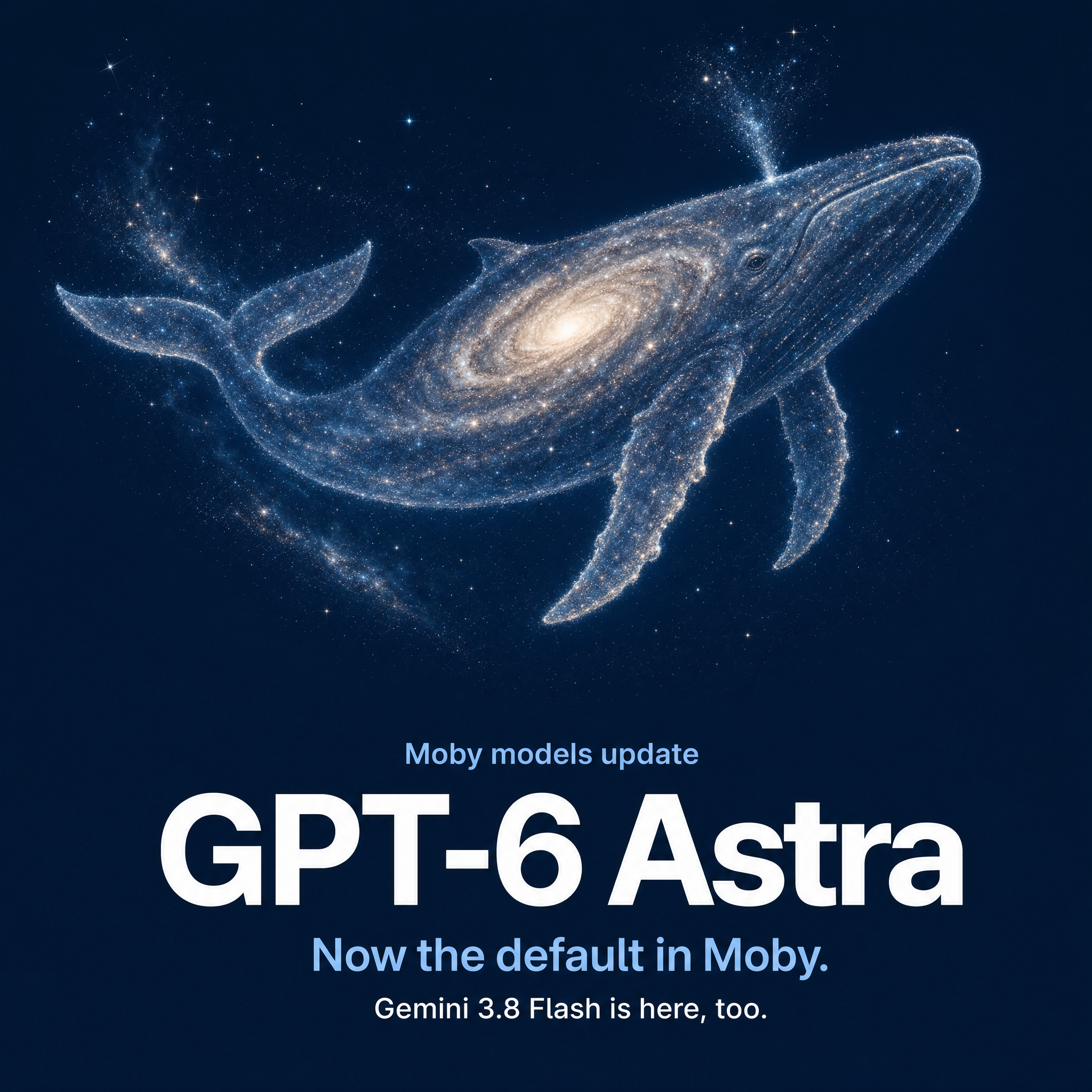
post-purchase survey / question → logic → attribution
Illustration of a post-purchase survey question flowing through conditional logic into attribution channels

When the structure is ready, tell Moby to install or enable it. Activation changes still follow your Moby action controls, so the operator remains in charge of what goes live. Read the survey guide.

post-purchase survey / four tools
01Review the current surveyQuestions, language, installation, activationinspect_post_purchase_survey
02Build or revise the surveyQuestions, answers, logic, mappingsconfigure_post_purchase_survey
03Enable the survey experienceMove an approved setup into useenable_post_purchase_survey
04Activate or disableControl whether the survey is liveset_post_purchase_survey_activation

Tracking Settings: audit first, refresh on demand

Reliable attribution starts before the click reaches Triple Whale. Moby now has two focused tools for Tracking Settings: one to inspect the parameters configured across supported ad channels, and one to refresh the status when the latest account changes have not been scanned yet.

Ask Moby which tracking parameters are present, which entities still need attention, or to refresh the check after your team updates campaigns. The refresh rechecks status; it does not silently rewrite an ad account.

tracking settings / two tools
01Inspect tracking parametersSee the current setup and gapsinspect_tracking_parameters
02Refresh parameter statusRescan after account changesrefresh_tracking_parameter_status
Why it matters
Classification
Consistent parameters help Triple Whale connect a visit to the source, campaign, and ad that produced it.
Confidence
A fresh status check separates a current gap from an old scan.
Control
Inspection and refresh are read paths; ad changes require the relevant ad-account action.

Traffic Rules: make attribution follow your business

Not every referrer deserves credit, and not every tagged visit arrives with the name your team uses. Traffic Rules let you override the default classification with explicit if/then logic: match a page URL or referrer, then exclude the event or assign it to the right channel.

Moby can now handle the full rule lifecycle. It can list the rules in force, test one rule or the full ordered rule set against a URL and referrer, create custom rules, delete them, and turn supported rules or strategies on and off.

traffic rules / test the route before it goes live
Illustration of traffic events moving through ordered rules to assignment or exclusion

Testing matters because priority matters: rules are evaluated from the top, and the first matching rule wins. New rules apply to future traffic rather than rewriting historical journeys, so Moby makes the test path available before the change path. Read the Traffic Rules guide.

traffic rules / six tools
01List rulesSee active and available rule setslist_traffic_rules
02Test one rulePreview one condition and actiontest_traffic_rule
03Test the ordered rule setSee which rule wins by prioritytest_traffic_rules
04Create rulesAssign or exclude matched trafficcreate_traffic_rules
05Delete rulesRemove custom logic by identifierdelete_traffic_rules
06Enable or disableControl a supported rule or strategyset_traffic_rule_enabled

Cost Settings: give Moby the real P&L inputs

Revenue and ad spend are only the top of the P&L. Moby can now inspect and maintain the operating costs Triple Whale uses to calculate profitability: product costs, handling, custom expenses, payment fees, and shipping.

The seven-tool surface starts with context. Moby can inspect the current configuration, find campaign choices for expense attribution, and list shipping methods before proposing a change. From there it can update product or variant COGS and cost history, maintain fixed or variable custom expenses, configure payment-gateway fees, and manage shipping preferences, profiles, or order-level imports.

cost settings / seven tools
01Inspect Cost SettingsRead the current cost model firstinspect_cost_settings
02List expense campaignsFind valid campaign mappingslist_custom_expense_campaigns
03List shipping methodsGround profile and method setuplist_shipping_methods
04Configure COGSProducts, variants, handling, historyconfigure_cogs
05Configure custom expensesFixed, variable, recurring, categorizedconfigure_custom_expenses
06Configure gateway costsPercent, flat fees, history, batchconfigure_payment_gateway_costs
07Configure shipping costsPreferences, profiles, order importsconfigure_shipping_costs

These inputs flow into Net Profit, margin, custom metrics, and profitability views across Triple Whale. Because historical costs and recurring expenses can change past and future reporting, Moby reads the current state before writing and routes consequential changes through your action controls. Shopify Payments fees remain managed automatically for Shopify stores. Read the profitability setup guide.

Clicks & Deterministic Views: configure the model with Moby

Clicks do not tell the whole story for paid social. Clicks & Deterministic Views combines first-party click journeys with deterministic ad views from supported platforms, then distributes normalized credit across eligible touches so each order is counted once inside the model.

Moby now has three tools for the setup: check whether the account has enough supported coverage, inspect the current attribution and data-sharing configuration, and configure the feature when the requirements are met.

clicks + deterministic views / one normalized order
Illustration of paid-media views and clicks converging into one normalized order

The model is intentionally time-sensitive. Click credit halves every seven days; view credit halves every day. Clicks update in real time, while deterministic view data refreshes daily and can take up to 48 hours to begin flowing after enablement. The model currently supports view sharing from Meta, TikTok, Pinterest, Vibe, and AppLovin; the attribution window shown elsewhere does not change this model’s built-in decay. Read the model guide.

clicks + deterministic views / three tools
01Check coverageValidate supported signal availabilitycheck_clicks_views_coverage
02Inspect attribution setupRead enablement, consent, and statusinspect_clicks_views_attribution
03Configure attributionApply the supported account setupconfigure_clicks_views_attribution
Aug 13
2026

More models are now available in Moby

Moby now includes Grok 4.6, Gemini 3.7 Flash, Grok Image Generation 2.0, and the Grok text-to-video model.

That gives you more choice across analysis, fast everyday work, image generation, and turning a written idea into a video draft—without leaving Moby.

new models / now in moby
New models available in Moby
Choose the model that fits the work
Analysis
Grok 4.6 is now available in Moby.
Fast work
Gemini 3.7 Flash adds another fast option for everyday tasks.
Images
Grok Image Generation 2.0 adds a new route for creating visuals.
Video
The Grok text-to-video model can turn a written idea into a video draft.

Moby can now speak and transcribe

New audio tools let Moby turn a script into speech—or a large recording into usable text.

For text to speech, create UGC reads, podcast segments, voiceovers, product demos, and other spoken content. Choose from more than 10 voices, and ask Moby for a preview before generating the full version.

For speech to text, transcribe large audio files and predefine keywords or phrases to remove from the transcript before Moby turns it into notes, clips, summaries, or follow-up work.

audio tools / text to speech + transcription
New text-to-speech and speech-to-text tools in Moby
New audio workflows
Voices
Choose from more than 10 text-to-speech voices.
Preview
Hear a voice preview before generating the full read.
Large files
Transcribe large audio files directly through Moby.
Clean-up
Predefine keywords or phrases to remove from the resulting transcript.

Pixel Settings are now available directly in Moby

Open Pixel Settings through Moby for a more direct path to inspect and work with your tracking setup.

pixel settings / now in moby
Pixel Settings available directly in Moby

Integration Settings are now available directly in Moby

Open Integration Settings through Moby and ask it to investigate the health of each connected integration and account.

Moby can show what is connected, what is not, and where there may be an issue. Connecting integrations or MCPs directly through Moby is coming soon.

integration settings / connection health
Integration Settings and account health in Moby

People Search brings professional context into Moby

Give Moby a person’s name, their company, and what you want to discover. The new specialized People Search capability can find publicly available professional context across the web.

people search / professional context
People Search for professional context in Moby
What People Search can surface
Role
Current role and professional background.
Context
Skills and professional location.
Profiles
LinkedIn and other public social profiles.
Aug 07
2026

SQL triggers let automations wait for the moment that matters

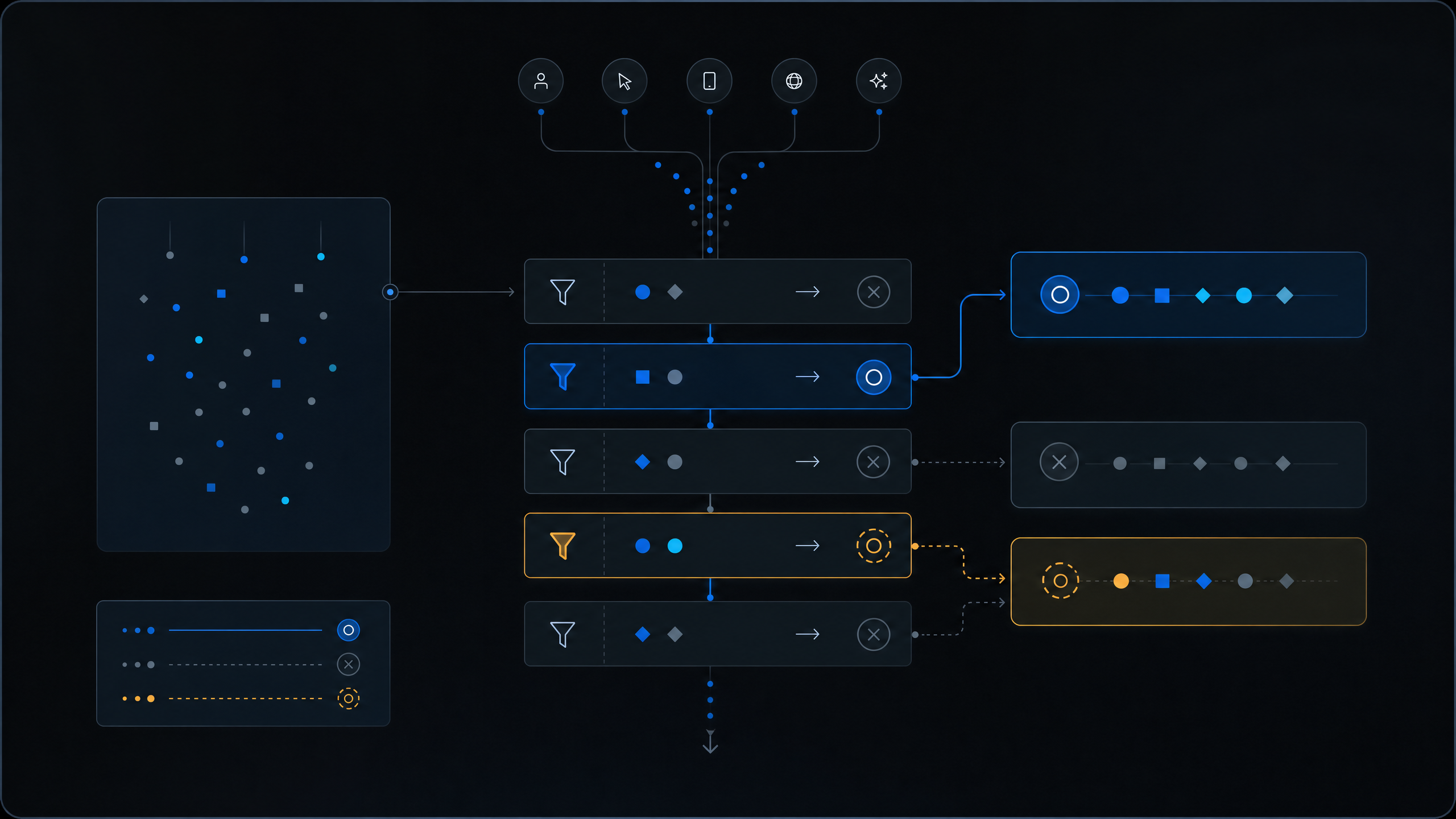
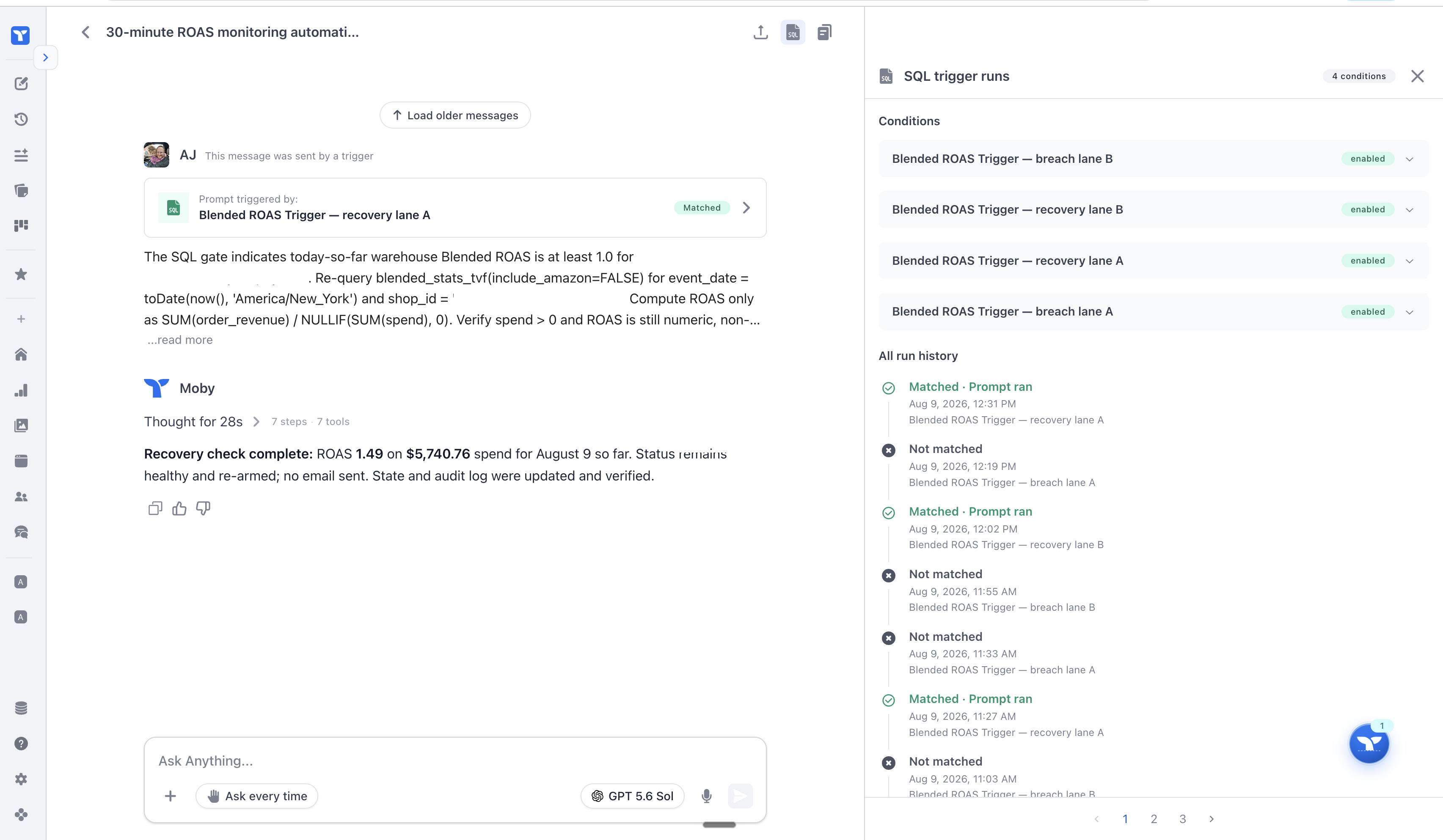
Automations can now start from a SQL trigger. Instead of invoking the model on every scheduled check, Moby runs a lightweight SQL query first and starts the automation only when the result matches the condition you set.

That is the right shape for threshold monitoring and anomaly detection. Check revenue, spend, conversion rate, inventory, or another warehouse signal as often as the operation needs. When nothing crosses the line, there is no LLM run. When it does, the automation fires.

The result is lower automation cost and much higher monitoring frequency without turning every check into an AI task.

automations / sql trigger
Moby automation builder with a SQL trigger
Built for continuous monitoring
Thresholds
Start a workflow only when a query result crosses the rule you defined.
Anomalies
Watch for unusual changes in the warehouse and wake Moby only when something needs investigation.
Frequency
Run lightweight checks more often without paying for an LLM invocation every time.

Seedance 2.5 is live in Moby

Seedance 2.5 is now available in Moby. Compared with Seedance 2.0, the underlying model doubles one-pass generation from 15 to 30 seconds and expands a reference packet from up to nine images, three videos, and three audio clips to up to 30 images, 10 videos, and 10 audio clips.

The bigger change is control. Seedance 2.5 improves long-form narrative continuity, subject consistency, transitions, motion, image quality, audio quality, and audiovisual synchronization. It also supports repeated extensions into longer sequences and timestamp-level edits for targeted changes to characters, actions, story elements, green-screen backgrounds, and camera perspective.

That means more of the story can happen inside one coherent generation, with a much richer reference set and finer control when one part needs to change. Read ByteDance’s Seedance 2.5 introduction.

seedance 2.5 / now in moby
Seedance 2.5 launch film · longer one-take generation · richer references · more precise edits
What 2.5 adds
One take
Up to 30 seconds in one pass, twice the previous 15-second limit.
References
Up to 30 images, 10 videos, and 10 audio clips in one reference packet.
Editing
Timestamp-level audiovisual control for targeted scene, subject, action, and camera changes.
Extension
Repeat extensions to carry a coherent sequence beyond a single generation.

DeepSeek V4 Flash is now in Moby

DeepSeek V4 Flash is now available in Moby’s model picker. Choose it when you want to route a task to DeepSeek while keeping the rest of the Moby workflow in one place.

deepseek v4 flash / now in moby
DeepSeek V4 Flash, now available in Moby
Jul 31
2026

Posting Moby creatives to Meta now feels built for the job

The handoff from finished creative to a live Meta ad now has a cleaner, more useful review experience. Moby lays out the exact campaign, ad set, ad, creative, and copy it is preparing before anything is posted.

You can inspect every pending action in one place, see where each change will land, and approve the full batch when it is ready. The result is a clearer path from creative work to governed execution.

meta + moby pet / review and approval
Moby review panel showing a Meta campaign, ad set, ad, creative, and copy ready for approval

Moby now promotes useful skills for the whole business

Moby already learns repeatable ways of working from individual users. The new automatic skill promoter turns the strongest of those learned workflows into shared business skills.

When a user-level skill proves useful, Moby can promote it to the shop level automatically. One person's working method can become a reusable capability for the whole team, so the skill system gets better as the business uses it.

How it compounds
Learn
Moby identifies repeatable workflows that are useful at the user level.
Promote
Strong learned skills can move into the business-level skill library automatically.
Reuse
The promoted workflow becomes available across the shop instead of staying with one person.

Reference a folder once. Let Moby handle the whole batch.

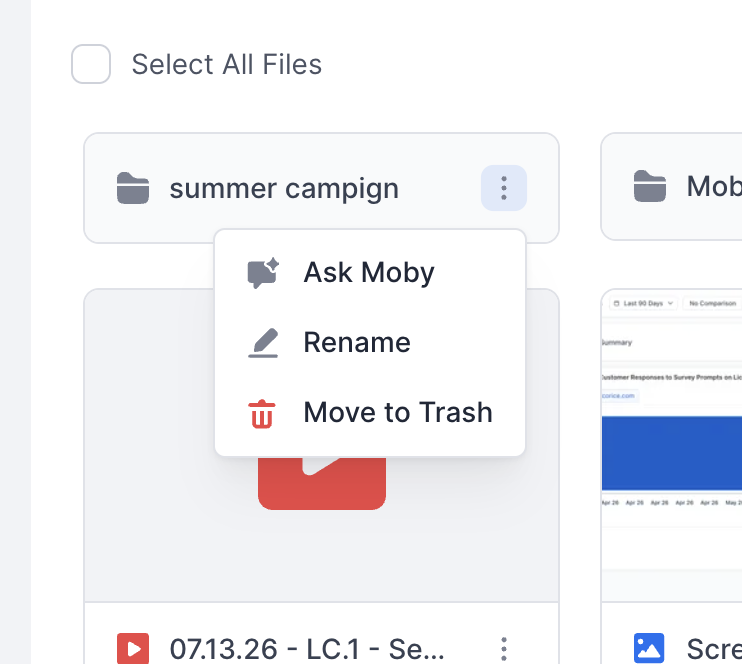
The Files Manager now makes folder-level work practical. Upload a folder, reference that folder in chat, and Moby can use the files inside it together.

That makes bulk uploads real: reference a folder once, let Moby take the files as a batch, and skip attaching each one by hand.

files manager / folder reference
Files Manager showing a folder-level Ask Moby action for bulk file workflows
What changed
Folders
Reference an uploaded folder directly instead of selecting every file one at a time.
Bulk upload
Moby can take the files in that folder together as one batch upload.

Moby Pet is a better command center for background work

The Meta review shown above also reflects a more useful Moby Pet panel. Pending actions are easier to scan, with the exact campaign, ad set, ad, creative, copy, and approval state laid out in one place.

That makes the pet a better place to keep an eye on background work and review the decisions Moby needs from you.

Jul 24
2026

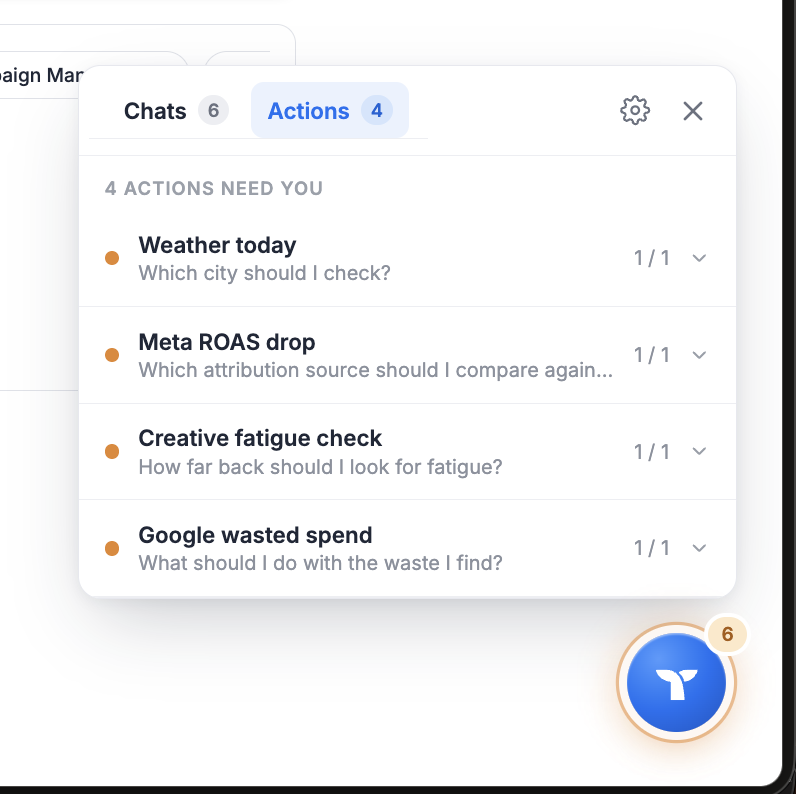
Moby Pet keeps every running chat in view

Moby no longer has to hold your attention while it works. Moby Pet is a small floating companion that sits above the app and tracks the chats you have running, so you can move to another page, start something else, and still see what Moby is doing.

The pet has three states. Resting when nothing is running, Running when Moby is working, and Awaiting approval when Moby needs a decision from you, with a badge for how many chats are waiting.

moby pet / states
01RestingNothing runningIDLE
02RunningMoby is workingLIVE COUNT
03Awaiting approvalMoby needs a decisionBADGE + REVIEW

Click the pet to open its panel. Every tracked chat shows where it stands: in progress, waiting on approval, completed, failed, or cancelled. Open a chat from the list, drop one you stopped caring about, or clear out everything that finished.

Approvals can be reviewed and decided from the panel itself. A decision made there resolves everywhere at once, in the chat, in the pet, and in any mini app showing the same request. If someone else already answered, you see the decision that won instead of a spinner that never ends.

Drag the pet anywhere, resize it, and it stays where you left it. On smaller screens the panel opens as a bottom drawer.

Moby Pet is off until you turn it on. Open Customize Moby, go to Pet, and flip the switch. Typing /pet in the composer toggles it too.

walkthrough / moby pet + async chats
Improvements & fixes
Approvals
A decision already made elsewhere now resolves the stale request with the winning answer instead of hanging on a spinner.
Approvals
A replayed event can no longer reopen an approval you already answered.
Composer
The input no longer overlaps the async send control.
Connection
A flapping connection no longer eats the reconnect budget after a successful connect.
Mobile
One close button in the pet drawer instead of two.

Async chats: send it and walk away

You no longer have to stay in a chat while Moby works. Send a message async and the chat keeps running on its own after you leave it.

The composer clears the moment you send, so you can start the next thing immediately. If the send fails, your text comes back exactly as you typed it.

Every async chat is tracked, so Moby Pet shows its status and hands you approvals as they come up. Async send is available in Moby chat; automations and mini apps keep their current behavior.

Claude Opus 5 is live for everyone

Claude Opus 5 is now a production model in Moby, available to all users. It replaces the early access identity it was tested under.

Opus 5 runs on the standard Anthropic routing path, Vertex AI first with Anthropic Direct held in reserve for retries. It defaults to standard effort, with extended and heavy available when a question deserves more thinking. Claude Sonnet 5 still defaults to extended.

Delegated sub agents can run on Opus 5 as well.

claude opus 5 / now live in moby
Claude Opus 5, now live in Moby
Jul 22
2026

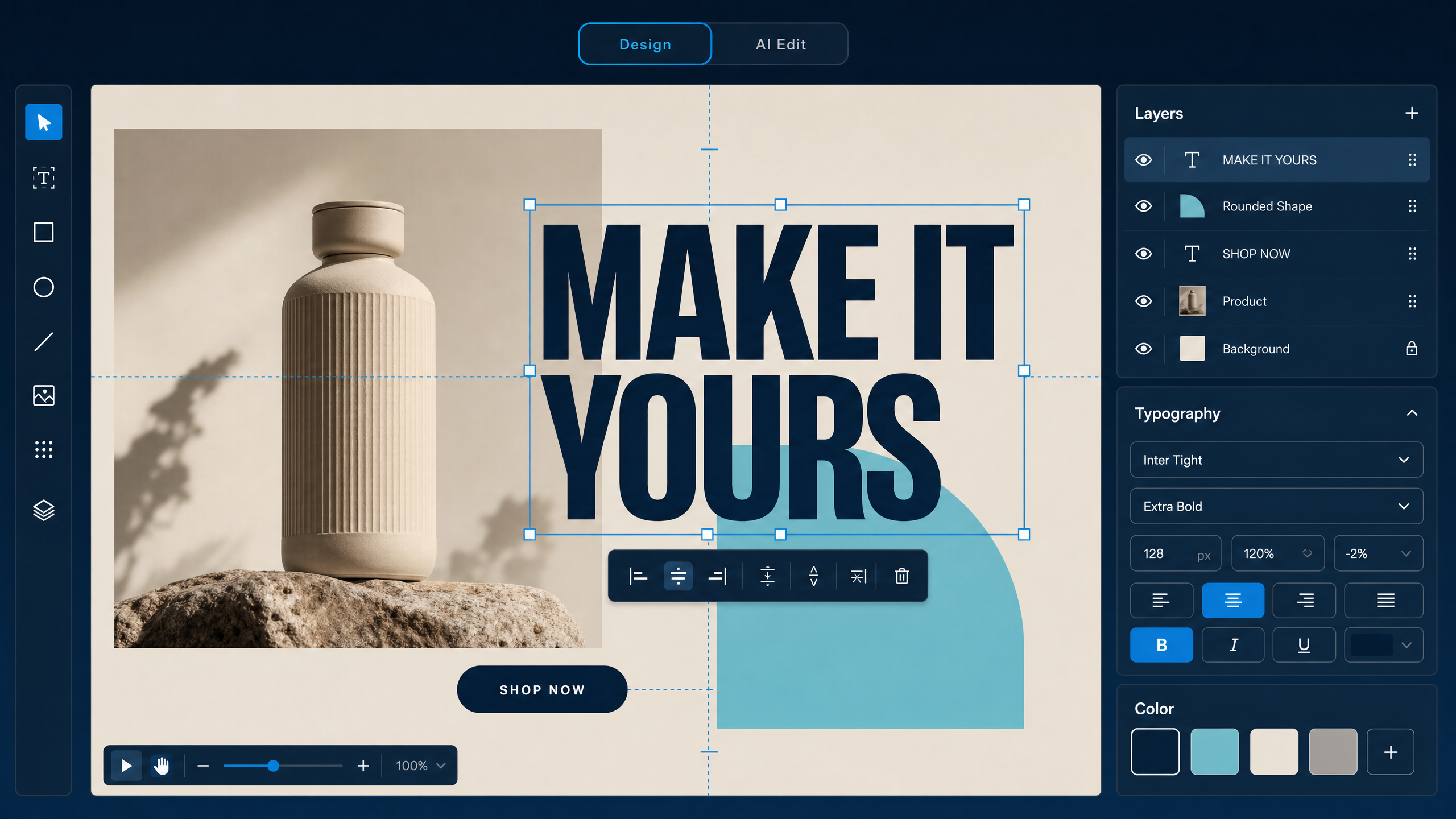
Creative Studio V3 is a full design canvas inside Moby

Moby can generate the starting image. Studio V3 gives you the tools to finish the creative without leaving Triple Whale.

The rebuilt canvas supports complete, layered compositions. Add multiple images and text blocks, crop images without changing the original, create shapes with custom fills and borders, and choose from more than 1,000 Google Fonts. Text controls now include flexible sizing, colors, outlines, and layer ordering.

studio v3 / illustrated canvas overview
Illustration of the Studio V3 layered canvas inside Moby

Editing is faster, too. Smart guides help align each element, a floating toolbar keeps the relevant actions close, and familiar keyboard shortcuts work for undo, copy and paste, delete, and precise positioning. Your work saves automatically as you go.

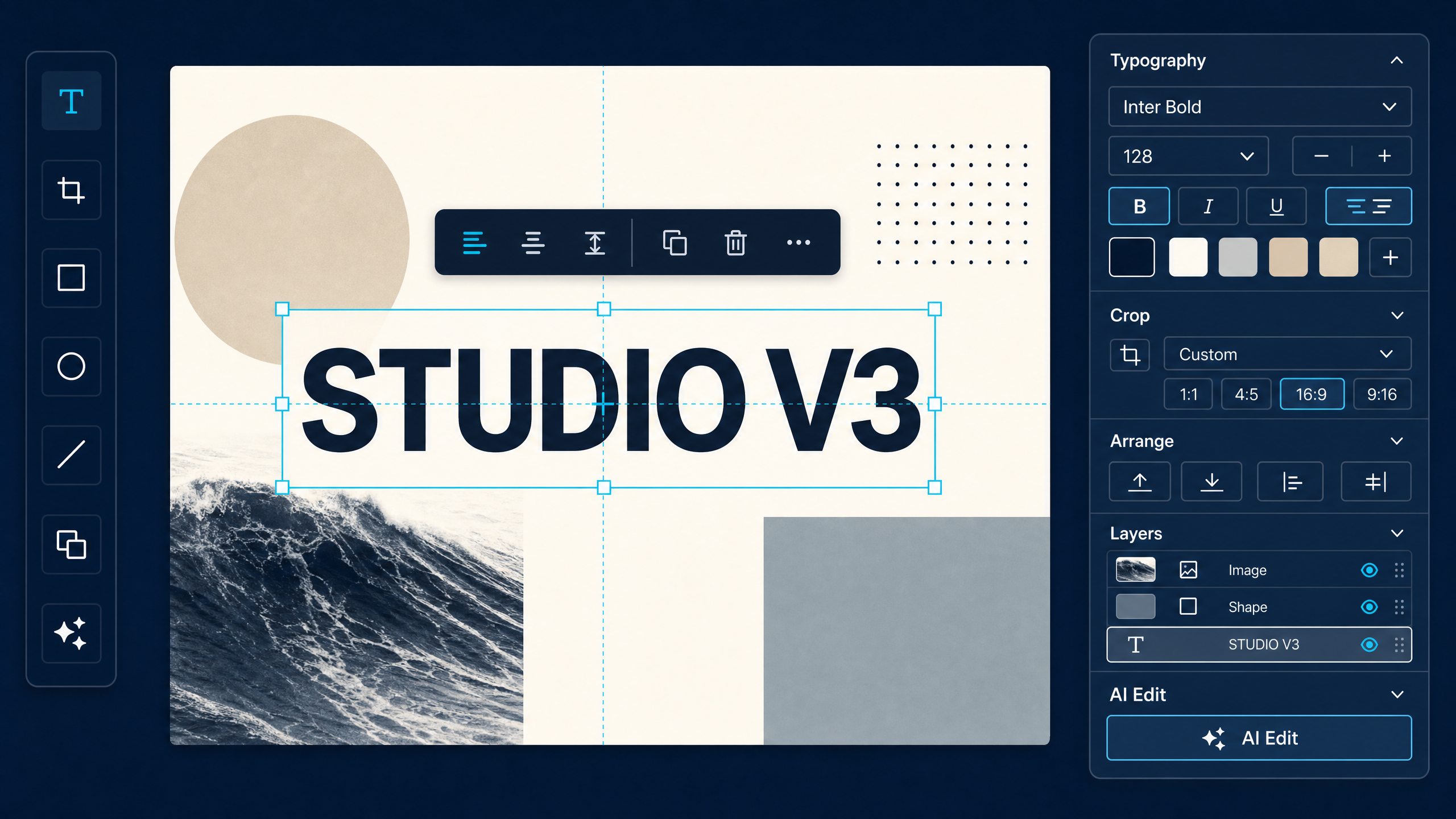
AI Edit is still available with a cleaner interface, so you can move from a Moby-generated image to a polished ad in one workflow.

studio v3 / illustrated precision controls
Illustration of Studio V3 typography, crop, arrange, layers, and AI Edit controls

To try it, open an image in Moby Chat and click the Studio icon.

Jul 16
2026

New budget and delivery actions for more ad channels

Moby was already connected to Snapchat Ads, TikTok Ads, Pinterest Ads, and Twitter Ads. This release expands what Moby can do once those accounts are connected.

On Snapchat, TikTok, and Pinterest, Moby can now change budgets and turn delivery on or off. Twitter remains available for account context, with write actions not included in this release.

ads managers / new budget and delivery actions
01Snapchat Ads ManagerNew actionsBUDGET + STATUS
02TikTok Ads ManagerNew actionsBUDGET + STATUS
03Pinterest Ads ManagerNew actionsBUDGET + STATUS
04Twitter Ads ManagerAccount contextREAD ONLY

Image generation, rebuilt around the models

Like video generation, image generation is no longer one generic route. Moby now has four dedicated tools for Gemini, GPT Image, Grok, and Seedream, so each model can be selected directly instead of being flattened behind one image-generation tool.

The model-first tool layer is live. The matching interface is rolling out today, bringing the same clearer model selection into the product.

image generation / four dedicated model tools
01GeminiDedicated generation routegenerate_image_gemini
02GPT ImageDedicated generation routegenerate_image_gpt
03GrokDedicated generation routegenerate_image_grok
04SeedreamDedicated generation routegenerate_image_seedream
image generation / model-first experience
Moby's upgraded model-first image generation experience

Save to Workspace and Save to Library now do different jobs

The Library now shows only artifacts and dashboards people explicitly save, so it reflects work you chose to keep instead of every output Moby created.

Save to Workspace saves the item into that workspace and also adds it to the Library. Save to Library adds it only to the general Library and does not attach it to a specific workspace.

How saving works
Workspace
Organized in the selected workspace and automatically visible in the Library.
Library
Saved to the general Library only, without adding it to a workspace.
Less clutter
Unsaved artifacts and dashboards no longer fill the Library.
save menu / workspace or general library
Save to Workspace and Save to Library options in Moby
Jul 09
2026

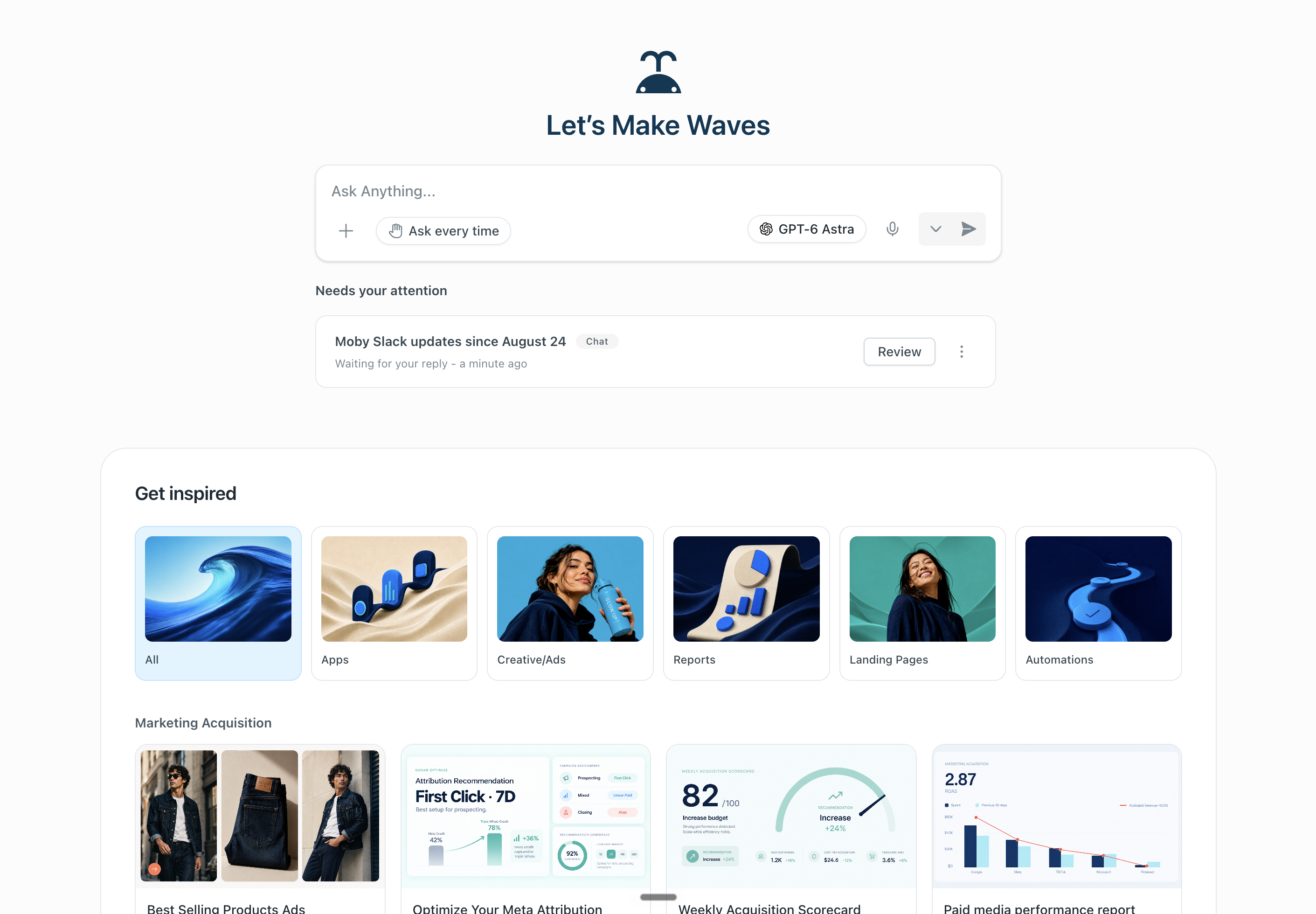
GPT-5.6 Sol is now Moby's default model

Moby now starts every new OpenAI conversation on GPT-5.6 Sol, replacing GPT-5.5 as the default. There is nothing to turn on. GPT-5.6 Terra and GPT-5.6 Luna are also available in the model picker when you want a different balance of depth, speed, and cost. Default reasoning effort remains Medium.

The upgrade is most visible when the work gets complicated: longer plans, professional analysis, coding, research, and multi-step execution. There is not one universal “smarter” number, but OpenAI's published comparisons show GPT-5.6 Sol ahead of GPT-5.5 across nearly every listed benchmark.

gpt-5.6 sol / the new default
GPT-5.6 Sol, the new default model in Moby
gpt-5.6 sol vs gpt-5.5 / published benchmark gains
01Management consulting43.2% vs 31.3%+11.9 PTS
02OSWorld 2.062.6% vs 47.5%+15.1 PTS
03SWE-Bench Pro64.6% vs 59.4%+5.2 PTS
04BrowseComp90.4% vs 84.4%+6.0 PTS

Programmatic tool calling makes Moby faster

Every GPT-5.6 model in Moby now uses programmatic tool calling by default. Instead of calling one tool, reading the entire response, and repeating that loop, Moby can write a lightweight in-memory program that coordinates a bounded set of tools, processes the intermediate results, and returns only the evidence the job needs.

That means fewer model round trips and less unnecessary context for tool-heavy work. Moby can fan out research, group and rank rows, join results, validate exact matches, and stop as soon as the answer is complete. The result is faster execution without flattening the reasoning or skipping the checks.

What changed
Speed
Independent read-only calls can run together instead of waiting in a serial queue.
Focus
Large tool responses are filtered and compacted before they return to Moby.
Accuracy
The program can join, deduplicate, aggregate, and validate results before Moby writes the answer.

Grok 4.5 is now available in Moby

Grok 4.5 has replaced Grok 4.3 in Moby's model picker. It is xAI's newest frontier model for coding, agentic tasks, and knowledge work, with configurable reasoning effort for jobs that need more depth.

Moby keeps the model choice in your hands. Pick Grok 4.5 when you want the newest xAI model, or stay with GPT-5.6 Sol as the new default.

grok 4.5 / now in the model picker
Grok 4.5, now available in Moby
Jul 07
2026

Video generation, rebuilt around the models

Video generation in Moby is no longer one generic tool. We broke every model out into its own tooling, so each one exposes the controls it can actually honor instead of flattening four different systems into the same prompt box.

Grok Imagine Video 1.5 is the fast still-to-motion route: one image, 1 to 15 seconds, source-ratio preservation, and 480p through 1080p. Veo 3.1 handles cinematic text generation, first-and-last-frame transitions, up to three visual references, a separate negative prompt, and optional generated audio.

Gemini Omni Flash can generate from text or references, then revise the result through a persistent interaction ID. You can change the environment or motion while protecting the product, camera, timing, and composition that already work. Seedance 2.0 takes the richest packet: up to nine images, three reference videos, three audio references, flexible ratios, exact 4 to 15 second timing or auto timing, and output up to 4K.

The workflow changed with the tools. Moby now proves one anchor clip, watches every result, classifies it as final, usable proof, targeted retry, or wrong route, and only stitches approved, compatible clips. Native generation still is not the right place for exact text, UI, captions, crossfades, or audio mixing.

model router / four tools, four control surfaces
01Grok Imagine Video 1.5Fast image-to-video1–15s · source ratio · 1080p
02Veo 3.1Boundary frames + negative prompt4 / 6 / 8s · audio · 1080p
03Gemini Omni FlashStateful generation + editsinteraction ID · 16:9 / 9:16
04Seedance 2.0Image + video + audio references4–15s / auto · adaptive · 4K
veo 3.1 / first frame → last frame / 1080p / 8 seconds
Veo carries the same watch from rain-dark slate into a warm paper studio between supplied boundary frames
gemini omni flash / original → stateful delta edit
Original: establish and preserve the product, camera axis, pacing, and negative space
Stateful edit: move the scene from graphite to paper without restarting the shot
boundary-frame truth / generated at 2K
Matte black chronograph on a rain-dark slate product set
First frame: product geometry and starting world
The same matte black chronograph in a warm paper studio
Last frame: protected product, new destination
What changed
Routing
Each provider now has its own strict tool and control surface. Moby recommends a route change before switching models; it never silently falls back.
References
The system now supports single-image motion, exact boundary frames, stateful revisions, and multimodal image, video, and audio reference packets.
Review
Every generated clip is watched before delivery. A retry has to change the shot, reference packet, task mode, or route in a meaningful way.
Assembly
Approved clips can be combined with measured duration and hard cuts. Resizing, crossfades, overlays, captions, and audio mixing remain outside this layer.

Sub-agents: parallelize complex workloads

Moby can now split big jobs into smaller ones and run them in parallel with sub-agents. Type @ in the composer and pick a mode. There are three, and each one solves a different problem.

Model delegation. Moby splits your task and runs it across four model providers: Google, Anthropic, OpenAI, and xAI. Each provider takes its own pass, then Moby synthesizes the best of all four into one answer. You get the strongest output from every lab instead of betting on one.

Structured sub-agents. Built for structured work at scale. Go over all my landing pages. Score every creative. Audit each campaign. Moby launches up to 50 sub-agents at a time, and when the job is bigger than that, it batches them until the work is done.

Full sub-agents. Full Moby capability inside a sub-agent. Each one can do anything Moby can do. Build a persona automation that reviews your ads and scores them against each persona, then run it on a schedule.

composer / @ subagents · structured output · model delegation
Three modes, one keystroke: @ Subagents, @ Structured Output Subagents, @ Model Delegation Subagents
sub-agents / 10 parallel runs from one prompt
One prompt, ten sub-agent sessions: open any one to watch it work, then Moby synthesizes all ten results into a ranked report
Improvements & fixes
Persistence
Sub-agents are persistent: Moby gives each one an identity and remembers them, so your persona scorer today is the same persona scorer next week.
Control
Specify which models your sub-agents use and how much effort they put in, per task.
Scale
Up to 50 sub-agents at a time; bigger jobs batch automatically until the work is done.
Review
Sub-agent work lands in your review queue before anything executes.
Jul 02
2026

Compass in Moby

Most teams treat measurement as a religion: pick MTA, or MMM, or lift tests, and defend the choice. But each method is just a different way of being wrong. MTA updates constantly and only sees correlation. MMM sees the whole budget and moves weekly. A lift test is causal ground truth you can’t run everywhere.

Compass, Triple Whale’s measurement suite, runs all three: MMM, incrementality testing, and MTA. As of today it lives inside Moby, which means the thing reading the measurements can also act on them. Ask where the next dollar works hardest and it answers in marginal ROAS. Ask which channels are saturating and it shows you the curve. And when MTA, MMM, and your experiments disagree, it says so and tells you what to validate next.

The interesting part is what happens when you stop visiting the dashboard. Put the reads on a loop: a budget brief every week off the fresh MMM refresh, a monitor that catches channels as they saturate, a triangulation report that flags disagreements. Pair them with Actions and the reallocations arrive queued for your approval. Explore Compass.

compass / mmm · incrementality · mta · triangulated
Compass in Moby: MMM, incrementality, and MTA triangulated
Improvements & fixes
Triangulation
MMM, incrementality, and MTA reconciled in one read; Moby flags where they disagree.
MMM
Incremental contribution, marginal ROAS on the next dollar, and saturation curves, refreshed weekly.
Geo Pods
Tighter geographic holdouts for cleaner lift tests: iROAS, lift %, and incremental revenue per test.
Automations
Schedule triangulated reads, saturation alerts, and budget briefs; pair with Actions to execute.
Attribution
Pixel models are unchanged; Compass reads sit alongside them, never replace them.
Forecasting
Time-series forecasts for revenue, spend, orders, and conversions with scenario planning.

The Library

Good work used to disappear into old chats. You'd ask Moby for a report, get exactly what you wanted, and three weeks later scroll through history trying to remember which conversation it lived in. The Library ends that: everything Moby makes (pages, reports, apps, media, files) sits in one place, organized across workspaces. Pin what you use, filter the rest, and stop excavating.

library / all files
The Library: pinned and all files across workspaces
Improvements & fixes
Navigation
The Library sits in the main navigation, one click from anywhere in the app.
Files
Pin the files you use; filter by workspace and file type.

Chat History

Conversations have a home now. The history page lists every chat with Moby, so you can find the thread from last Tuesday and pick it up mid-sentence.

history / conversations
The Chat History page

Stateful apps

The difference between a page and a tool is memory. A page shows you numbers; a tool remembers what you did with them. Apps Moby builds now hold state, so what you save in one session is waiting in the next. Create a workspace, dashboard, or app straight from the home screen, or start from pre-built apps and drafts.

apps / 38 seconds inside a live data app
A stateful app on live shop data: open it, pop into edit mode with Moby alongside, preview desktop and mobile, go fullscreen, then drill from posts into comments
Improvements & fixes
Apps
Manifest-based builds; existing apps update in place by id instead of forking.
Data
Read-only SQL with saved result files for reproducible numbers.
Layout
Tile-first information architecture for metric-dense pages: every number gets its own tile.

@ tools. / skills. # tables.

The hardest part of asking an AI anything is telling it where to look. The composer now has a grammar for exactly that: type @ to point Moby at a connector or tool, / to invoke a skill, and # to aim the question at an exact data table.

When you already know where the answer lives, you shouldn’t have to hope Moby guesses right. You point. @ settles the “which source?” question before it comes up, / turns a saved workflow into two keystrokes, and # locks the query to the table you meant. The first answer comes from the right place, and you spend your words on the work instead of the directions.

composer / @ connectors · / skills · # tables
One keystroke each: @ opens Connectors & Tools, / opens Skills, # opens Tables
Improvements & fixes
Composer
@ opens Connectors and Tools; choose where Moby should look before it starts.
Skills
/ lists business skills and Triple Whale skills; invoke a repeatable workflow inline.
Data
# scopes the question to an exact table, so numbers come from the source you meant.
Jul 01
2026

The new Summary page + Pixel

The most corrosive bug in analytics is two surfaces that disagree about the same number. So we rebuilt the Summary page (the operating picture of your business) and the Pixel underneath it as one project, and it is live for every customer. The payoff: the same number, everywhere, in a Summary tile, on a dashboard, and out of Moby's mouth.

summary / pins & custom metrics
The new Summary page: ask anything bar, pinned KPIs, and custom metrics
Improvements & fixes
Summary
Affiliates section is GA; thirteen Ads sections enter beta on the rebuilt backend.

Triple Whale MCP

Your data shouldn't be loyal to one interface. The data platform for ecommerce is now open: the same context Moby runs on (metrics, attribution, definitions) works in Claude and any MCP client. Ask from wherever you like to work; the numbers come from the same place.

Improvements & fixes
Access
Available on Foundation, Automate, and Enterprise.
Jun 29
2026

A teammate in Slack

Most Slack bots wait to be summoned. Moby doesn't. Add it to a channel and it's in the room: following what's happening, keeping its own memory of that channel, and speaking up on its own when it has something worth saying, the way a colleague sitting next to you would.

slack / moby in the channel
Moby as a teammate inside a Slack channel: present, aware, and typing
Improvements & fixes
Channels
Add Moby to any channel; it's aware of everything happening in it.
Memory
Memory per channel: context, decisions, and preferences persist where they were made.
Proactive
Moby chimes in unprompted when it spots something worth flagging.
Jun 25
2026

Moby Actions

The distance between “you should lower that budget” and the budget actually being lower is where most tools stop. Moby now crosses it. Around 500 actions are live across your connected platforms: budgets, bids, statuses, campaigns, audiences, discounts, emails, even ad comments. Each one is deterministic: an explicit, bounded change mapped to the exact campaign or entity before anything runs. You can read what is about to happen, and to what.

Who pulls the trigger is up to you. “Ask every time” queues each action with its reasoning, and you approve it, reject it, or argue with it. Write rules and Moby takes the obvious calls alone (“pause anything below 1× ROAS”) while checking in on the rest. The Actions Log keeps the record (what ran, when, why, in what mode) in the session, in automations, in the workspace, and across Moby. Put actions inside an automation and a morning routine like “cut the losers, scale the winners across Meta and Google” runs whether you slept in or not. Actions are the building blocks; automations make them repeatable. Read the media-buying deep dive.

actions / media buying · approve · reject · discuss
Narrated walkthrough: unmute for the story. Rules in, approvals out, every change logged.
Improvements & fixes
Scale
~500 actions across Meta, Google, AppLovin, Shopify, Klaviyo, Audiences, and social comments.
Control
Approve, reject, or discuss every action, or set thresholds Moby can act on alone.
Actions Log
Full audit trail (action, status, mode, and rationale) at session, automation, workspace, and account level.
Media buying
Rule-based scaling, cutting, and pausing across ad platforms from one place.

New image and video models

Knowing which model is good at what is a full-time job, so Moby took the job. Four image engines and four video engines sit behind one prompt surface: you describe the shot, Moby picks the model. Instruction-heavy layouts with live text route to GPT Image 2. Photoreal product work goes to Nano Banana Pro, fast iteration to Nano Banana 2, stylized frames to Grok. Motion runs on Seedance 2.0, with Veo 3.1 for text-to-video and Gemini Omni Flash for video-to-video edit passes.

Video reaches 4K with multi-clip scripts: one brief becomes a sequence of shots, with negative prompts and reference routing so the subject survives every cut. Images reach 4K with up to sixteen reference inputs, which is what makes real editing possible. Composition, product, and identity hold across passes instead of morphing.

Nothing ships blind. Moby looks at every render before you do, checks it against the brief and the Brand Vault, and reports a verdict with the caveats attached. Everything below was made this way, start to finish, inside Moby.

model index
01GPT Image 2DefaultInstruction-following, text renderingIMG · 2K · 16 REF
02Nano Banana ProHighest-fidelity photorealIMG · 4K · 14 REF
03Nano Banana 2Fast iteration, editingIMG · 4K · 14 REF
04Grok ImagineStylized looksIMG · 2K · 3 REF
05Seedance 2.0DefaultMulti-clip scripts, image referencesVID · 4K · 8/15/30S
06Veo 3.1Text-to-videoVID
07Gemini Omni FlashVideo-to-video edit requestsVID · V2V
08Grok Imagine Video 1.5Stylized motionVID · PREVIEW
model picker / creative
Creative model picker: image and video generation
made in the studio / video · seedance 2.0
Hero film · 30s multi-clip script · one brief, six shots
Splashdown · slow motion · T2V · 8s
Macro plate · light sweep · 8s
made in the studio / stills
Whale tail hero frame, Nano Banana Pro
Hero frame · Nano Banana Pro · 4K
Paid social frame with live typography, GPT Image 2
Paid social, live type · GPT Image 2
Stylized story frame, Grok Imagine
Story frame · Grok Imagine
Improvements & fixes
Reasoning
Models across OpenAI, Anthropic, Google, and xAI, including Claude Fable 5 and Claude Sonnet 5, with a thinking-effort dial.
Video
Multi-clip scripts with negative prompts and human-reference routing on Seedance 2.0.
QA
Every render is inspected before delivery: path, thumbnail, verdict, caveat.
Formats
Aspect ratios from 1:1 through 21:9 and 9:20, with a center-crop resize pipeline.
Motion
Deterministic GSAP-based HTML video presentations for social edits, captions, and UGC-style cuts.
Jun 23
2026

Connectors

An assistant that can only read your other tools is a spectator. This wave of connectors gives Moby hands. It reads the sheet, drafts the email, files the ticket, updates the board, ships the deploy.

That changes the size of what one instruction can carry. A single thread now moves work across surfaces: pull the campaign data, build the model in Sheets, brief the team in Slack, log the decision in Notion, open the follow-up in Linear. You ask once, and nothing gets pasted between systems by hand.

The governance stays boring on purpose. Every external write can be held for your review before it runs, and Moby reports a change as done only when the tool itself confirms it.

customize moby / connectors
Connectors in Customize Moby
connected surfaces
Google Workspace: five live connectors
Google SheetsSheets
GmailGmail
Google CalendarCalendar
Google DriveDrive
Google DocsDocs
Engineering & infrastructure: build, track, ship
GitHubGitHub
LinearLinear
AtlassianAtlassian
NetlifyNetlify
CloudflareCloudflare
SupabaseSupabase
Go-to-market & comms: sell, post, align
HubSpotHubSpot
SlackSlack
NotionNotion
Improvements & fixes
Actions
External mutations are verified from tool evidence before Moby reports them done.
Permissions
"Ask every time" review mode: every action waits for approval before it runs.
Deploys
Netlify deploys default to updating the existing site instead of creating new ones.
Jun 22
2026

Brand Vault

Generic output is what happens when the model doesn't know who you are. The Brand Vault fixes the knowing. Moby extracts your brand DNA from your live site and public sources and stores it as a structured vault: logos, color tokens, typography, voice, visual motifs, personas, and canonical asset links.

Every creative surface reads from it, so images, video, landing pages, and reports start from your system: your palette, your type, your voice. Point Moby at a brand once and everything it makes afterward answers to the same source of truth.

brand_vault / extracted tokens
Color system
Typography
Every frame answers to the data.
INTER TIGHT 600 · -0.02EM · DISPLAY
Voice: spare, declarative, operator-grade. No exclamation marks.
Improvements & fixes
Creative
Generated media is checked against brand constraints (identity, logo, packaging, copy) before it ships.
Artifacts
Landing pages and reports pull palette and type directly from the vault.
Integrity
Missing brand elements are reported, not invented.

Memory management

Memory you can't inspect is a rumor. Moby's memory is now a set of pages you can open. It runs at four levels: you, your shop, Slack, and each workspace, and every level is readable and editable in Customize Moby. Your preferences stay personal, team knowledge is shared by everyone, Slack keeps its own thread of context, and each workspace remembers its own project. What carries into a conversation is exactly what's on those pages.

If a wrong fact got stuck, delete the line. If there's something Moby should always know, write it in yourself. And if you're arriving from another assistant, import your memory from other AI providers: Moby starts already knowing what it should.

customize moby / memory
Memory in Customize Moby: view memory and import from other AI providers
Improvements & fixes
Levels
User, shop, Slack, and workspace memory are separate, inspectable, and independently editable.
Control
Edits apply immediately; the next conversation reads the memory you wrote, not the one Moby inferred.

Skill management

A skill is a playbook: a step-by-step workflow Moby loads and follows exactly. Two libraries now live in Customize Moby. The built-in Triple Whale library is ours to maintain, so it keeps improving underneath you. Your business's own skills are yours to write and edit, line by line.

You never pick a skill from a menu. When a request matches a workflow, the right one loads on its own. And Moby writes skills itself: it watches how you actually work and drafts playbooks from the repetition. Run a workflow a few times and it hardens into something Moby executes the same way every time, for you or for anyone on the team.

customize moby / skills
Skills browser in Customize Moby
Improvements & fixes
Editing
Business skills are fully editable; the default Triple Whale library is read-only and maintained by us.
Routing
Skills load automatically when the workflow matches; no manual selection.
Self-authored
Moby proposes skills learned from your usage; you review them before they're promoted.

Business context

An assistant that knows ecommerce is easy to find. One that knows your business is not. Give Moby the documents that define it (brand guidelines, strategy memos, pricing, SOPs, positioning) and it stops guessing.

Context is durable. Upload once, and every chat, report, artifact, and automation is grounded in how your company actually thinks. Nobody re-attaches files. Nobody re-explains the basics at the top of a thread.

customize moby / business context
Business context file library in Customize Moby
Improvements & fixes
Scope
Context is shop-wide; everyone's Moby reads from the same source of truth.
Usage
Referenced silently: answers reflect your context without you pointing at it.
Jun 11
2026

Automations

The first Moby 2 rolling launch, and the foundation for everything after it. Anything you run with Moby once can now run on a schedule: media-buying automations, recurring reports, monitoring loops. You define them in plain language, they execute on time, and every save is verified.

The word “schedule” undersells it. Automations are stateful loops: every run remembers the last one (baselines, ledgers, open questions, decisions) and picks up exactly where it left off. A run can stay on the main thread or launch sub-threads of its own, a swarm of agents working one job, fanning out in parallel and reporting back. A monitor that remembers what it flagged yesterday, escalates what changed, and hands the deep dives to sub-agents is doing something no cron job can.

True Classic already runs 100% of its Meta spend through Triple Whale. Read the launch post.

automations / 33 seconds inside
A live run: stateful thread, editable instructions, the actions log, and a new plan
Improvements & fixes
Library
The Automation Library: proven automations you can adopt in one click.
Design
New automation screen design.
Slack
One automation can post to a channel and DM individuals in the same run.
Scheduling
Timezone-aware schedules with explicit IANA zones for business-hour runs.
State
Runs carry state forward; each execution reads what the previous one learned and decided.
Threads
Main-thread or sub-thread execution: one automation can orchestrate parallel agents and synthesize their results.
Jun 08
2026

Upgraded memory

Moby dreams. After every session it replays the conversation and decides what deserved remembering: the preferences you stated, the corrections you made, the way your business actually works. Then it writes that into durable context. You never have to say "remember this," though that works too. It gets smarter while you're gone.

Memory lives at two levels, you and your shop, so the learning compounds in both directions. What you teach Moby follows you into every conversation. What your team teaches it raises the baseline for everyone.

Tell it once; it stays told.

Improvements & fixes
Memory
Corrections stick the first time; you stop repeating yourself.
Dreaming
Post-session consolidation runs on its own; Moby reflects, distills, and saves without being asked.
Compounding
User-level and shop-level memory means every chat, by anyone on the team, improves the next one.
· Beginning of the log · You've reached the first entry. New ones ship weekly.